
Search for answers or browse our knowledge base.
On-Premise to Cloud Migration Process – Epicor ECM & IDC
Overview
This article outlines the standard process Mosaic follows when migrating a customer from an on-premise environment to the Epicor Cloud.
The process applies to both:
- Epicor ECM
- Epicor IDC
The migration uses a two-phase approach to reduce downtime, limit risk, and ensure data integrity during cutover.
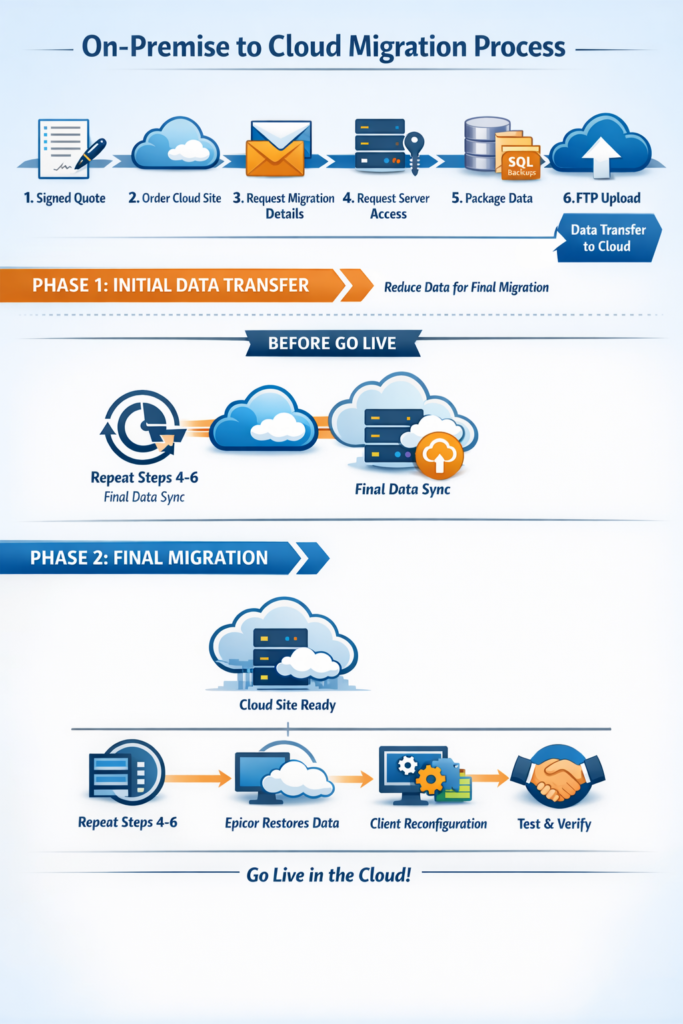
Migration Strategy: Two-Phase Approach
Phase 1 – Initial Data Transfer (Pre-Go-Live)
Objective: Reduce the volume of data required during final cutover.
Step 1 – Signed Quote & Project Initiation
- Sales receives signed agreement
- Cloud site is ordered and provisioned
Step 2 – Migration Preparation
Mosaic Technical Team:
- Requests data upload instructions
- Requests remote server access
- Confirms environment details
Step 3 – Data Packaging (After-Hours)
Mosaic packages:
- SQL database backups
- DocPath data
- Image files
- System configuration components
Packaging is typically performed after-hours to avoid production impact.
Step 4 – Initial FTP Upload
- Data is securely transferred to the cloud environment
- Epicor prepares the cloud environment for final cutover
Result: The majority of historical data is staged in advance.
Phase 2 – Final Migration (Go-Live Cutover)
Scheduled the night before go-live, coordinated with:
- Customer
- Mosaic
- Epicor
Final Data Sync
Steps 2–4 are repeated:
- Final SQL backup
- Final DocPath/data packaging
- Final FTP upload
Only new or modified data (delta changes) are transferred.
Cloud Restoration
Once final data is received:
- Epicor restores the databases and document storage
- The cloud site is typically accessible by mid-morning the next business day
Post-Restoration Activities
Client Reconfiguration
Mosaic will:
- Reconfigure installed client applications
- Update connection settings to the cloud environment
- Validate integrations and data connectivity
Customer Requirement
The customer must provide at least one on-premise client machine to:
- Handle integration traffic between cloud and internal systems
- Support ERP integrations
- Support Datalink and other automation processes
This client acts as the bridge between cloud and on-premise systems.
Testing & Validation
After reconfiguration:
- Customer performs functional testing
- Integrations are validated
- Document retrieval and workflow are verified
- Formal confirmation of migration completion is received
Project is then formally closed.
Downtime Expectations
- Minimal downtime during final cutover
- Most production data is transferred during Phase 1
- Only incremental changes are transferred during Phase 2
Important Notes
- IDC migrations follow the same two-phase strategy
- After-hours packaging is standard best practice
- Go-live timing is coordinated to minimize business disruption
- A stable internet connection is required for cloud access
Summary
The Mosaic On-Premise to Cloud Migration process is:
- Structured
- Low-risk
- Coordinated with Epicor
- Designed to minimize downtime
- Repeatable and standardized
For project-specific timelines or scope clarification, contact Mosaic Team.